Processing...
To create a calculator, you have to be logged into vCalc. The blue create button is located on the light blue banner atop the vCalc window as indicated by the red arrow in the picture below.

Once you have logged into vCalc, click on the Create button at the top right of the screen and choose Calculator (second option in the dropdown menu).
This will take you to the Calculator Editor user interface.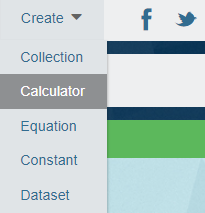
The Calculator Editor has four tabs: Info, Content, Design and Permissions.
Steps to Create a Calculator with the Calculator Editor:
- Log into your vCalc account
- Click on the red "Create" button at the top right of the wiki page.
- Choose "Calculator" from the drop menu
- Enter the relevant data in each of the three tabs on the calculator editor's window
When you first launch the Calculator Editor, it will take you to the Info tab (see Next Article).