In the Equation Editor, go to the Algorithm Tab. The Algorithm Tab is the primary programming user interface for coding a vCalc equation. vCalc currently uses the Groovy programming language with a few vCalc specific additions. For general information on Groovy, see groovy-lang.org. For examples of Groovy in vCalc, you can always look at the Algorithm of any existing vCalc equation within the equation's wiki page by selecting "See Algorithm" at the bottom. You can also see standard Groovy syntax used in vCalc by clicking HERE. Note: Java code is typically accepted as Groovy code.
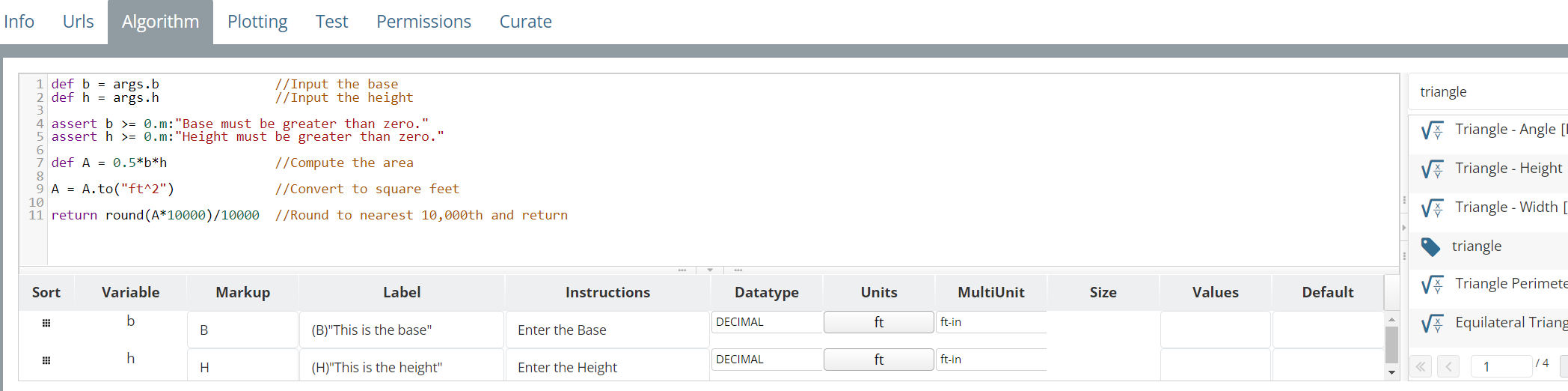
There are three sections to the Algorithm Tab: Coding Window (top left), Equations and Constants Window (right), and the User Inputs Window (bottom when user inputs are coded in the Coding Window).
Coding your Equation
Within the Algorithm Tab, 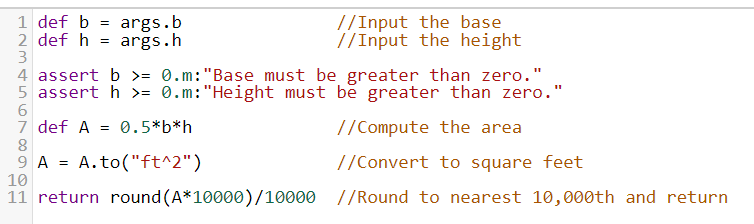 you will see the Coding Window. It is a blank section with line numbers down the left side. Click inside the window to enter your vCalc (Groovy) code. Note: For security purposes, vCalc precludes global variables and all variables must be defined locally with the def statement.
User Input Variables
To create a User Input variable, define a local variable, and assign its value from vCalc's reserved parameter map args, e.g. def b = args.b. In this example from line 1 in the picture above, vCalc will:
- Recognize the use of the args parameter map, create a user input variable `b`, and automatically display the user input option menu at the bottom of the coding window.
- Create a local variable `b` and assign to it the value entered by the user for `b`.
The User Inputs have the Variable name, a Markup field, Label, Instructions, Datatype, Units, Size, Values and Defaults.
- The Variable name is automatically populated when the args map is used in the Coding Window. The # before a variable name (e.g. #dog) has the same effect, but the # may not be supported in this way in the future. Therefore, use args. (e.g. args.dog).
- The Markup is a display option for that input parameter (See AsciiMath Help). This is useful for parameters with names in the greek character set like alpha (α) and beta (β) etc.
- The Label is where you can enter text to help describe the input parameter. This is displayed to the equation users. Note: this field defaults to ASCIIMath (Mathml). Therefore, math symbol replacements occur. If you see math symbols in your label, put the text in double quotes. "in" produces in, but without the quotes it produces the set inclusion symbol.
- The Instructions is meant to be additional information to describe the input parameter if the Label description is too short.
- The Datatype is used to designate where the input parameter is an integer, decimal, string, vector, matrix, integer array, decimal array or string array.
- The Units feature lets give units to the input parameters. There are over 60 unit categories (e.g., pressure, temperature, currencies) with over 550 different unit types to support topics like general construction, engineering, physic, chemistry and general commerce. vCalc's math engine intelligently handles units and unit combinations, and in doing so, gives equation calculators far more utility. (See Help with Units).
- The MultiUnit feature lets you accommodate units that multiple components such as feet with inches and fraction of inches, or angles that are in degrees, minutes and seconds.
- The Size features lets you give dimensions to vectors and matrices, e.g., a three dimensional vector or a 6x6 matrix.
- The Values section lets you create a list separated by commas that is turned into the list of possible choices when using the equation (e.g., 1,2,3,7,10 in example below) . If provided, then when using the equation a user must choose the input value from one of the items provided in this list. This works for decimals, integers and strings. Decimal types can have units, e.g., 4.2ft,14.3in,1.7m.
- The Default is the value that is automatically populated for the input parameter. However the user can override this when using the equation. The default value can have units if they match the unit type specified e.g., 2.2ft for a length parameter. The default field can also accept a UUID for a constant that will be used to populate the default field. See example of this HERE. If no units are specified, the default value is assumed to have the default units.

Note: you can use utilize vCalc equations and data items with function calls from within your equation, and in essence use existing equations and data items as subroutines to minimize redundancy of code, simplify maintenance and reduce errors.
You can also find help in the following help documents: