In the Data Item Editor, go to the Algorithm Tab. The Algorithm Tab is the primary programming user interface for coding a vCalc Data Item. vCalc currently uses the Groovy programming language with a few vCalc specific additions. For general information on Groovy, see groovy-lang.org. For examples of Groovy in vCalc, you can always look at the Algorithm of any existing vCalc Data Item within the Data Item's wiki page by selecting "See Algorithm" at the bottom. You can also see the standard Groovy syntax used in vCalc by CLICKING HERE.
There are two sections to the Data Item's Algorithm Tab: the Coding Window (top left), and the Equations and Data Item Window (right).
Coding your Data Item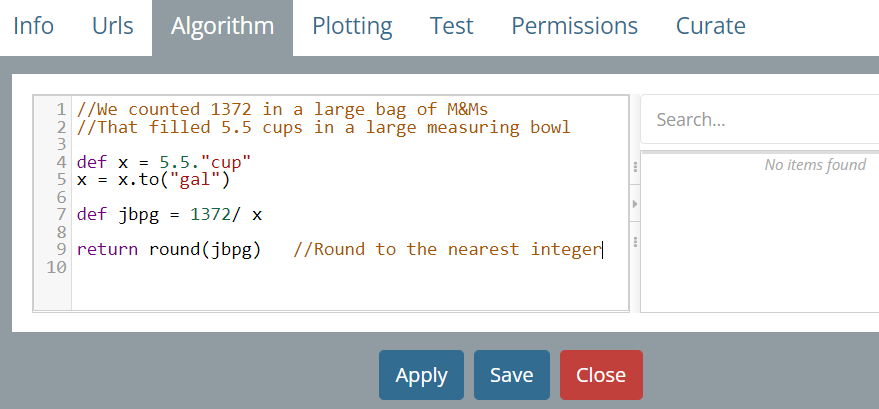
Within the Algorithm Tab, you will see the Coding Window. It is a blank section with line numbers down the left side. Click inside the window to enter your vCalc (Groovy) code.
Note: For security purposes, vCalc precludes global variables and all variables must be defined locally with the def statement.
In the enclosed example, where the Data Item named M&Ms per Gallon is equal to 3,991 per gallon (1/gal). This is a simple numeric Data Item with units and a simple algorithm. See Help with Units for the syntax of creating a Data Item with units (e.g. 2.2 centimeters/second).